Detect failed 3D prints from a single webcam image with AI
Print Vision: AI-Powered 3D Print Failure Detection API
Introduction
A failed 3D print can waste hours of printing time and a significant amount of filament.
A webcam pointed at a 3D printer can already provide everything needed to detect many common failures — but continuously processing camera images locally is not always practical, especially for small Raspberry Pi-based printer monitoring systems.
To make this easier, I developed Print Vision, an HTTP API that can determine whether a 3D printer is currently producing a good print or a failed print from a single camera image.
The API accepts a JPEG, PNG, or WEBP image and returns a probability that the print has failed.
It can also optionally return an attention heatmap, allowing you to see which part of the image influenced the model’s prediction.
▶️ Demo video
Why not use LLM like GPT and Gemini
Costly and slow.
Print Vision API: one inference take under 0.5 sec and is free
Print Vision API
Print Vision is designed to make this functionality accessible through a simple HTTP API.
The API accepts the raw image bytes directly, so no JSON image wrapper or multipart upload is required.
For example:
curl --request POST \
  --url 'https://print-vision.p.rapidapi.com/v1/predict' \
  --header 'Content-Type: image/jpeg' \
  --header 'x-rapidapi-host: print-vision.p.rapidapi.com' \
  --header 'x-rapidapi-key: YOUR_RAPIDAPI_KEY' \
  --data-binary @print.jpg
The response is simple:
{
  "failed_probability": 0.842317
}
A value close to 0 indicates a likely successful print, while a value close to 1 indicates a likely failed print.
Attention heatmaps
One of the features I wanted to include from the beginning was a way to inspect why the model made a prediction.
A probability such as:
{
  "failed_probability": 0.999997
}
is useful, but it is still a black-box prediction.
Print Vision can therefore optionally return an attention heatmap:
curl --request POST \
  --url 'https://print-vision.p.rapidapi.com/v1/predict?include_attention=true' \
  --header 'Content-Type: image/jpeg' \
  --header 'x-rapidapi-host: print-vision.p.rapidapi.com' \
  --header 'x-rapidapi-key: YOUR_RAPIDAPI_KEY' \
  --data-binary @print.jpg
The response contains:
{
  "failed_probability": 0.842317,
  "attention_jpeg_base64": "/9j/4AAQSkZJRgABAQAAAQ..."
}
The base64-encoded JPEG can be directly decoded and displayed.
Attention heatmap example. The highlighted regions indicate the areas that contributed most strongly to the prediction.
 Original image |  Attention map of the neural network, predicted failure probability: 1 |
This is particularly useful when investigating false positives and false negatives during development.
It also makes it possible to sanity-check whether the model is actually looking at the print rather than relying on an accidental correlation such as the background, camera position, or lighting.
Training data
The model is trained using tens of thousounds of crowdsourced 3D printing images rather than relying exclusively on images captured under one controlled laboratory setup.
The diversity of the data is important.
A model trained entirely on images from one printer in one room can achieve excellent validation accuracy while performing poorly when deployed somewhere else.
The goal is therefore not simply to achieve a high training accuracy, but to build a model that can generalize to real-world printer monitoring environments.
Model performance ROC curve
The ROC curve is particularly useful because the probability returned by the model can be converted into different decision thresholds.
ROC curve evaluated on the held-out test set.
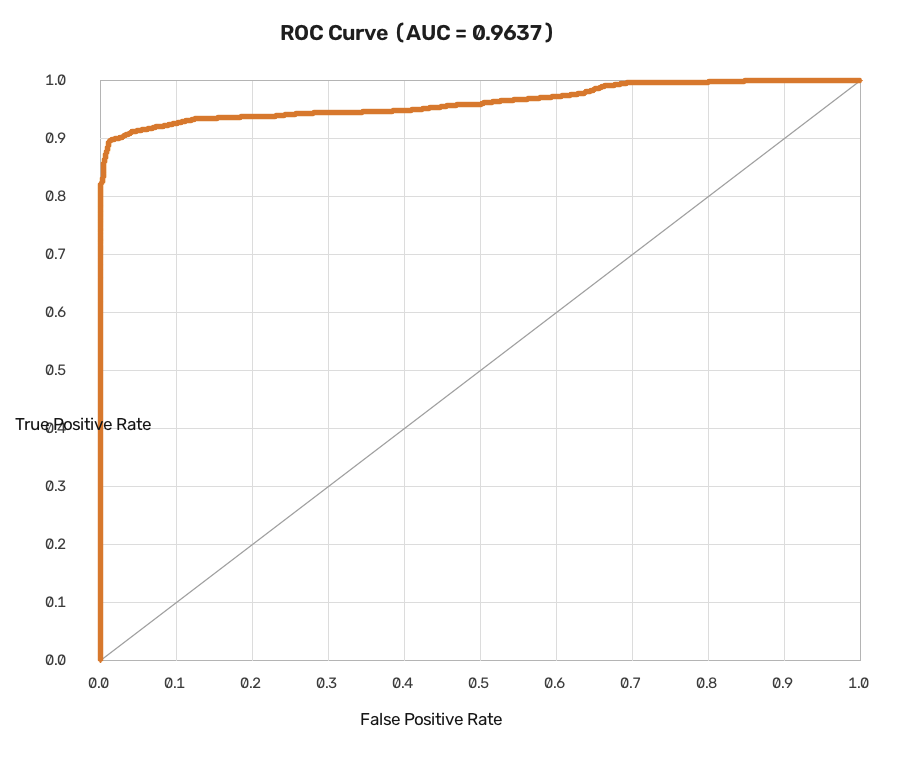
The production threshold can then be chosen according to the intended application.
Conclusion
The long-term goal is simple:
Give every 3D printer a pair of eyes.
If you are building a 3D printer monitoring system, Raspberry Pi project, OctoPrint integration, or another computer-vision application, you can try the API through RapidAPI.